Buying guide · Sources checked 22 October 2026
Viral Vue review & buying guide
Viral Vue combines an Amazon Chrome extension with a web dashboard for product research, video placement information and Creator Connections workflows. Here is what the published plans actually include, what costs extra and how a product-research task works.

Affiliate links — we may earn a commission, at no extra cost to you.
What this review is based on
This is a desk-researched buying guide using the provider’s public pages and demonstrations. We have not used a signed-in account, tested paid features, measured earnings, or completed a checkout to test the discount. Product descriptions and images below are provider-supplied; suitability advice is our editorial assessment, not a hands-on test result.
The buying decision
Start with Free if you only need the Amazon overlay, Viral Score and basic storefront tools. Starter adds Product Vue and scanning; Professional is the relevant tier if Creator Connections tools and brand-message automation are the reason you are buying. Do not buy Professional solely to try Product Vue: the provider lists that feature on Starter. Before adding a second subscription such as Oink, identify a specific task your existing tool cannot do—both products cover research and campaign workflows.
Pricing, free access & plan limits
| Plan | Published price (USD) | What is included | Limits / qualifications |
|---|---|---|---|
| Free | $0 ongoing | Chrome extension overlay, Viral Score, top/bottom carousel detection, CA & UK cross-checker, brand-deal tracker, storefront optimiser and basic AI credits. | Not a trial of every paid feature. Product Vue and the paid Creator Connections toolkit are not listed in this tier. The provider does not specify a numeric basic AI-credit allowance on the pages checked. |
| Starter | $39/month, billed monthly; or $390/year, paid annually | Free features plus Product Vue, sales estimates, order-history scanner, parent-ASIN tagger, video downloader, storefront scanner/spy and Creator Studio insights. | Does not include the Professional Creator Connections tools. Expanded AI credits are listed without a numeric allowance. Annual billing is an upfront yearly purchase, not a $33 monthly payment. |
| Professional | $79/month, billed monthly; or $790/year, paid annually | Starter features plus Creator Connections tools, Product & ASIN Findr, brand-message automation, total influencer video count, campaign insights, profits dashboard and verified media kits. | The help centre lists 100 Creator Connections messages per day. Advanced AI credits are listed without a numeric allowance. Unlimited messaging requires the separate add-on. |
| Unlimited Messages add-on | $20 listed add-on price | Removes the Professional plan’s 100 Creator Connections messages/day limit. | An add-on, not a standalone plan. The help-centre text does not specify its billing interval; confirm that and the total in account billing. |
Provider-supplied prices in USD, before any unconfirmed code or tax. The pricing page shows rounded annual equivalents of $33/month and $66/month; these are not monthly-billed prices. The help centre explicitly lists monthly billing at $39 and $79. Annual totals work out to about $32.50 and $65.83 per month. The provider says plans can be changed or cancelled anytime; check billing terms for renewal, cancellation timing and refunds. Free is ongoing, not a time-limited paid-plan trial.
10% discount code: what is confirmed?
AIP Toolkit lists AIPTOOLKIT as a 10% discount code. The public provider pages we checked did not confirm its eligible plans, new-customer restrictions, duration, renewal treatment or expiry. We have not tested the code at checkout, so its current acceptance and conditions remain unverified. Copy it and check the displayed total before committing to a paid plan.
Before paying, check whether the code applies to your selected plan, billing period and account. Only proceed if the checkout shows the expected discount and an acceptable final total. Do not assume it covers renewals or combines with other offers.
Inside Viral Vue
Official provider images—not screenshots from our own account. Example figures are not promised results.
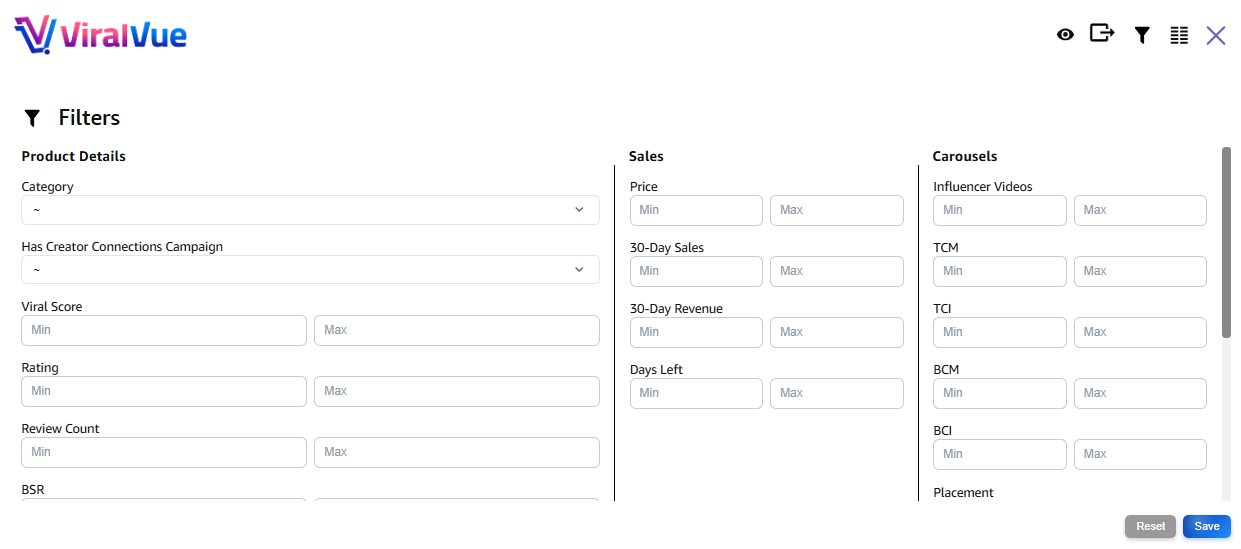
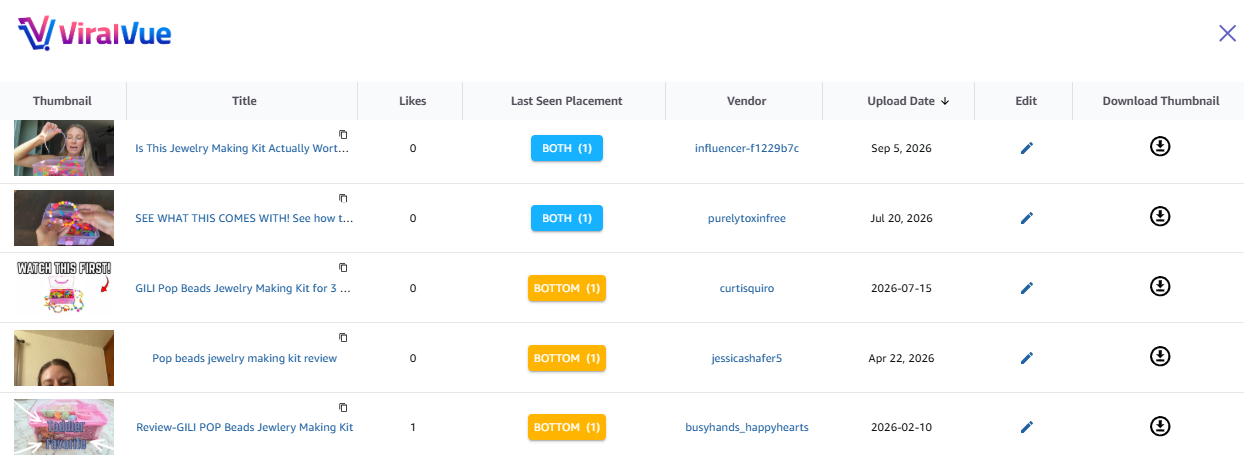
Task walkthrough: shortlist products you already own
A practical workflow based on the provider’s published demonstration, not a task we completed in an account.
- 1
Open Amazon order history and launch Product Vue
On a supported Amazon page such as Order History, click the Viral Vue side tab, or open the Amazon extension and select Product Vue. The provider lists Product Vue as a Starter-or-higher feature. This task starts with products you already own rather than a new shopping list.
- 2
Choose the columns and filters that answer your question
Use the filter or column icon at the top right. For a content shortlist, inspect price, sales information and carousel competition. Creator Connections and detailed influencer-video data may require Professional; do not assume the Free overlay includes all these fields.
- 3
Inspect individual opportunities instead of trusting one score
Where your plan exposes Total Influencer Videos, click the number to open the video-detail table. Look at existing content and the current product page before deciding what you could usefully demonstrate. A low video count alone does not mean your video will receive placements or earn commissions.
- 4
Save a manageable shortlist
Use the product checkboxes and Add to Idea List to retain candidates. The provider also documents export and campaign-related bulk actions; only use actions available on your plan and review campaign terms before accepting anything.
- 5
Re-check the product before filming
Refresh stale carousel data, verify the ASIN and current availability on Amazon, then make a review only if you can genuinely demonstrate the product. The useful output is a researched shortlist, not a guaranteed earnings forecast.
This walkthrough is adapted from the provider’s Product Vue documentation, not a completed hands-on test. Some illustrated columns belong to higher tiers. Sales estimates, scores and historical data are decision aids, not promises; follow Amazon’s current content and campaign rules.
Consider it if…
- You need to research products across an Amazon page rather than inspect each one manually; Product Vue is the Starter-level reason to upgrade.
- You have recurring Creator Connections and messaging work that justifies Professional’s higher cost.
- You will use both the browser overlay and dashboard, rather than paying for features you will not open.
Hold off if…
- You only need the core overlay or basic storefront tools; try the ongoing Free plan first.
- Another subscription already covers your product research and campaign tasks, with no identified gap.
- You expect a Viral Score, sales estimate or subscription to guarantee Amazon approval, video placement or earnings.
Questions before subscribing
Is Viral Vue free, or just a free trial?
It has an ongoing $0 Free plan. The pricing page says there is no free trial because the Forever Free tier supplies core features. Product Vue and the wider Creator Connections tools require paid tiers.
Why does Viral Vue show $66/month if monthly billing is $79?
The $66 figure is the provider’s rounded monthly equivalent of $790 annual billing, paid yearly. The help centre lists Professional monthly billing at $79. Starter is similarly $39 billed monthly or $390 yearly.
Which plan includes Product Vue and Creator Connections?
Product Vue is listed on Starter and Professional. The wider Creator Connections tools and brand-message automation are listed on Professional, whose documented allowance is 100 CC messages/day before the unlimited-message add-on.
Does the AIPTOOLKIT code give 10% off renewals?
We cannot confirm renewal coverage, eligible plans, duration or current acceptance from the public provider pages. AIP Toolkit lists the code as a 10% offer, but it has not been tested at checkout. Confirm the discount and renewal terms before paying.
Has AIP Toolkit tested Viral Vue in an account?
Not for this guide. It is based on official public pricing, help-centre instructions and provider screenshots. The workflow and suitability advice are not firsthand testing or measured earnings results.
Sources & verification notes
Public pages checked 22 October 2026. Provider information may change after this date.
- Viral Vue pricing and plan comparison
Free features, annual totals, rounded annual monthly equivalents and the ongoing Free plan. No public confirmation of AIPTOOLKIT terms found here.
- Viral Vue help centre: pricing plans and features
Actual monthly billing ($39/$79), annual billing ($390/$790), tier allocation, 100 CC messages/day and the $20 unlimited-message add-on.
- Viral Vue help centre: Product Vue
Supported Amazon pages, filters, column selection, checkboxes, video-detail views, exporting and the two provider screenshots shown above.
How it compares
Viral Vue Starter is $39/month and adds Product Vue; Oink Pro is $29.99/month and bundles its suite. Viral Vue Professional is $79/month for its wider campaign toolkit. Oink also offers research and campaign features, so compare the exact task and free-tier limits before paying for both.
Read our Oink for Influencers review